Overview
ShortApply is a Chrome Extension (MV3) that uses Claude AI to automatically fill job application forms based on the user's resume — reducing the time spent on repetitive applications from minutes to seconds.

ShortApply is a Chrome Extension (MV3) that uses Claude AI to automatically fill job application forms based on the user's resume — reducing the time spent on repetitive applications from minutes to seconds.
Applying to multiple jobs means filling the same fields over and over: name, email, work experience, cover letter variations, salary expectations. The friction is real, and it compounds fast across dozens of applications.
• Cmd+Shift+F — scans all visible form fields on the page and fills them in a single API call. • Cmd+Shift+U — fills a single focused field for more targeted control. • Supports text inputs, textareas, and dropdowns (Claude picks the closest matching option). • Optimistic UI: fields are filled immediately with a confirmation bar that lets you undo or edit any response before committing. • Works on any job platform — LinkedIn, Greenhouse, Lever, Workday, and others.
Stack: Chrome Extension Manifest V3 · Vanilla JS · Anthropic API (Claude Haiku). Key decisions: • Service worker architecture — the API key and CV text are read exclusively inside the background service worker, never exposed to content scripts. This prevents key leakage through page-level JavaScript or XSS. • Prompt caching — the CV block in the system prompt uses cache_control: ephemeral, so repeated calls within a 5-minute window only charge ~10% of the input token cost. Meaningful savings during an active job search session. • Single API call for bulk fill — instead of one request per field, the extension sends all visible fields in a single structured prompt and receives a JSON array back. Claude returns numeric indices for dropdowns and null for fields it can't answer with confidence. • Prompt injection guard — a security constant is appended to every system prompt instructing the model to ignore any instructions embedded in field labels or page content. • SPA compatibility — field values are set via the native prototype setter (Object.getOwnPropertyDescriptor) and paired with synthetic input and change events, ensuring React, Vue, and Angular forms register the change correctly. • i18n — supports Portuguese, English, and Spanish with runtime language switching, loading locale files dynamically via fetch(chrome.runtime.getURL(...)) since chrome.i18n.getMessage() can't be overridden at runtime.
Building a browser extension that interacts with arbitrary third-party form structures pushed me to think carefully about reliability across wildly different DOM patterns. Label detection alone required a multi-strategy fallback: <label for>, aria-label, aria-labelledby, closest ancestor label, and nearby sibling text — in that order. Getting AI to reliably pick dropdown options required restructuring the prompt to present numbered options and ask for only the number back, not free text. The security model of MV3 service workers — which terminate between events — turned out to be an asset: there's no persistent state to leak, and sensitive data is read fresh from storage on each request.
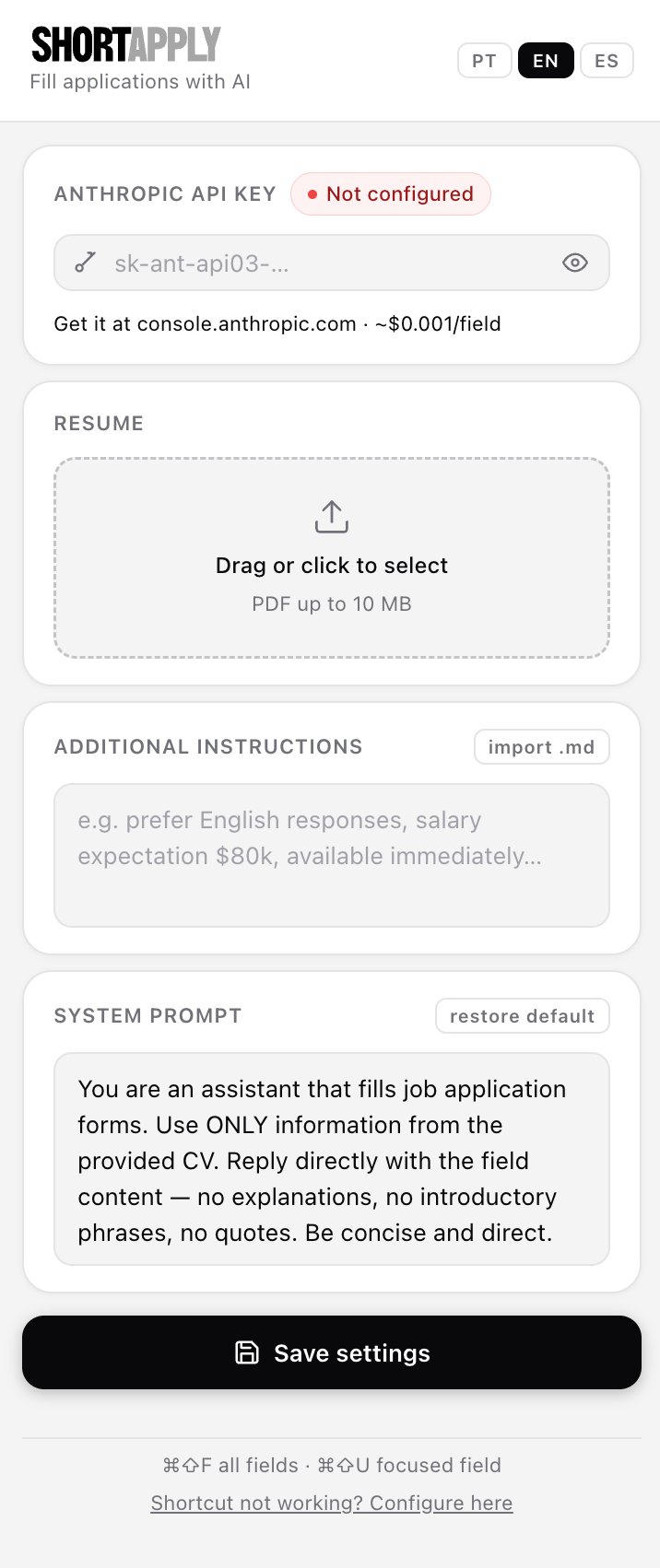
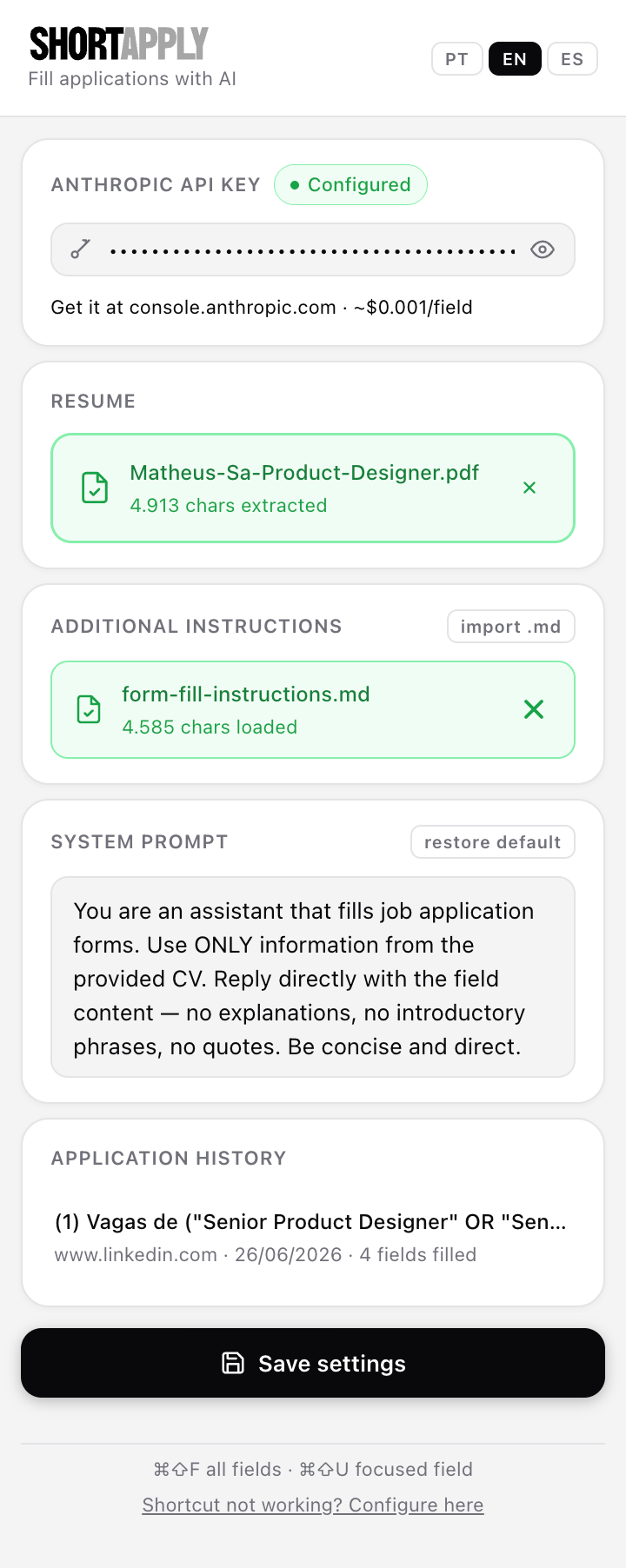
Fill job application forms with AI — so you can spend less time copy-pasting and more time actually getting hired.
ShortApply is a Chrome Extension that reads your CV and uses Claude AI to fill out job application forms for you. You hit a shortcut, it fills all the fields. Done.
It handles text inputs, textareas, and dropdowns. It works on most ATS platforms — Greenhouse, Lever, Gupy, Workday, LinkedIn Easy Apply, and plenty more. It even reaches inside iframes, which is where a lot of those modal-based forms hide.
Applying for jobs is mostly the same 15 questions over and over. Name, email, phone, LinkedIn, years of experience, cover letter, salary expectation — repeated across dozens of platforms with slightly different layouts. It's tedious, and that tedium shouldn't stand between good candidates and good jobs.
I wanted something that understood my CV and answered those questions the way I would — not a generic autofill that just pastes stored values into fields.
For a single focused field, ⌘⇧U fills just that one — useful for tricky textarea questions where you want to review the answer before moving on.
.md file or write freeform instructions for Claude (salary expectation, preferred language, things not in the CV)chrome://extensions, enable Developer modeshortapply/ folderCost: Claude Haiku is extremely cheap — roughly $0.001 per field without caching, less with it. A full application with 10 fields costs about a cent.
| Thing | What it does |
|---|---|
| Chrome Extension MV3 | Manifest version 3, service worker architecture |
Claude Haiku (claude-haiku-4-5) | The AI model doing the actual reasoning |
| Anthropic Prompt Caching | Caches the CV block between calls |
| PDF.js (bundled) | Extracts text from the uploaded CV locally |
| Vanilla JS | No frameworks — the whole extension is plain JS + CSS |
No backend. No servers. Your CV and API key stay in Chrome's local storage. The only external call is to api.anthropic.com.
shortapply/
├── manifest.json       # MV3 config — permissions, commands, content scripts
├── background.js       # Service worker — calls Anthropic API, handles commands
├── content.js          # Injected into every page — finds fields, fills them
├── content.css         # Confirm bar, toast, overlay, flash animation
├── popup.html          # Extension popup UI
├── popup.js            # Popup logic — CV upload, instructions, history
├── popup.css           # Popup styles
├── _locales/           # i18n strings (pt_BR, en, es)
├── lib/                # Bundled PDF.js
├── icons/              # Extension icons
└── brand/              # Logo assets
| Shortcut | Action |
|---|---|
| ⌘⇧F / Ctrl+Shift+F | Fill all visible fields |
| ⌘⇧U / Ctrl+Shift+U | Fill the currently focused field |
Shortcuts can be reconfigured at chrome://extensions/shortcuts.
chrome.storage.local — never sent anywhere except api.anthropic.comchrome:// pages, PDFs opened in the browser, etc.)ShortApply runs entirely on your machine. There are no servers, no databases, no accounts, and no analytics.
The only data that leaves your device is what's strictly necessary to generate answers: your CV text and the form field labels are sent directly to Anthropic's API when you trigger a fill. Your API key is stored locally in Chrome's storage and is never transmitted anywhere else.
You are responsible for the data you choose to process with this extension. Do not use it with sensitive documents you wouldn't be comfortable sending to a third-party AI provider. By using ShortApply, you agree that the author bears no liability for any data exposure resulting from your own use of the tool, misconfiguration of your environment, or Anthropic's handling of API requests.
For details on how Anthropic handles API data, refer to their Privacy Policy.
MIT